


This post is all about the Best YouTube SEO Tools for 2026 — the absolute *must-have* tools every YouTuber will need if they want their videos to rank, their audience to sgrow, and their revenue to finally take off ……just like your dog when you say the word “treat”.
TL;DR: What Are the Best YouTube SEO Tools of 2026?
The best YouTube SEO tools for 2026 are TubeBuddy, VidIQ, Semrush, Tubics, and YouTube Studio Analytics. These five tools help you find the right keywords, improve your titles and descriptions, analyze competitors, and boost your video rankings fast — even if you’re a beginner.
Best YouTube SEO Tools for 2026 (List Version)
Use these tools to improve your video keywords, titles, tags, and analytics so your channel can grow faster and make more money.
The Best YouTube SEO Tools of 2026 (Beginner-Friendly Guide)
If you’re looking for the best YouTube SEO tools to grow your channel in 2026, you’re in the right place. YouTube is the second-largest search engine in the world, which means the creators who understand SEO get discovered — and the ones who don’t? Unfortunately, they stay invisible.
This guide breaks down the simplest tools beginners can use to get more views, improve rankings, and optimize videos without feeling overwhelmed.
What Is YouTube SEO?
YouTube SEO is how you help your videos show up in search results and suggested video feeds. In simple terms, YouTube SEO tells YouTube:
• what your video is about
• who should watch it
• when to recommend it
When you do this right, your videos perform better — even without a huge audience.
Why SEO Matters for Beginners
YouTube uses your:
✔ keywords
✔ title
✔ analytics
✔ description
✔ tags
…to decide where your video belongs.
Better SEO = more visibility = more views = more money.
Let’s walk through the tools that make this easy, especially if you’re just starting.
The 5 Best YouTube SEO Tools of 2026
Below are the top tools creators rely on in 2026. These are the ones worth your time — and your budget.
#1. TubeBuddy (Best Overall YouTube SEO Tool)
I personally recommend TubeBuddy for beginners. It’s simple, powerful, and makes SEO so much easier. If you’re going to invest in one tool, this is the one…..hands down!
What TubeBuddy Does
TubeBuddy integrates directly into YouTube and helps you:
• find keywords
• optimize titles
• choose tags
• test thumbnails
• bulk edit videos
• update older content
• compare competitors
How TubeBuddy Helps You
✔ Save Time
• Instant tag suggestions
• Description templates
• Bulk updates
✔ Improve Video Rankings
• Keyword Explorer
• SEO Studio
• Search score predictions
✔ Boost Engagement
• A/B thumbnail testing
• CTR comparisons
• Auto-translated titles
✅ TubeBuddy Pros
• Easy for beginners
• A/B thumbnail testing
• Great keyword research
• YouTube-certified
• Has a free plan
✅ TubeBuddy Cons
• Free version is limited
• One license per channel
• Occasional extension glitches
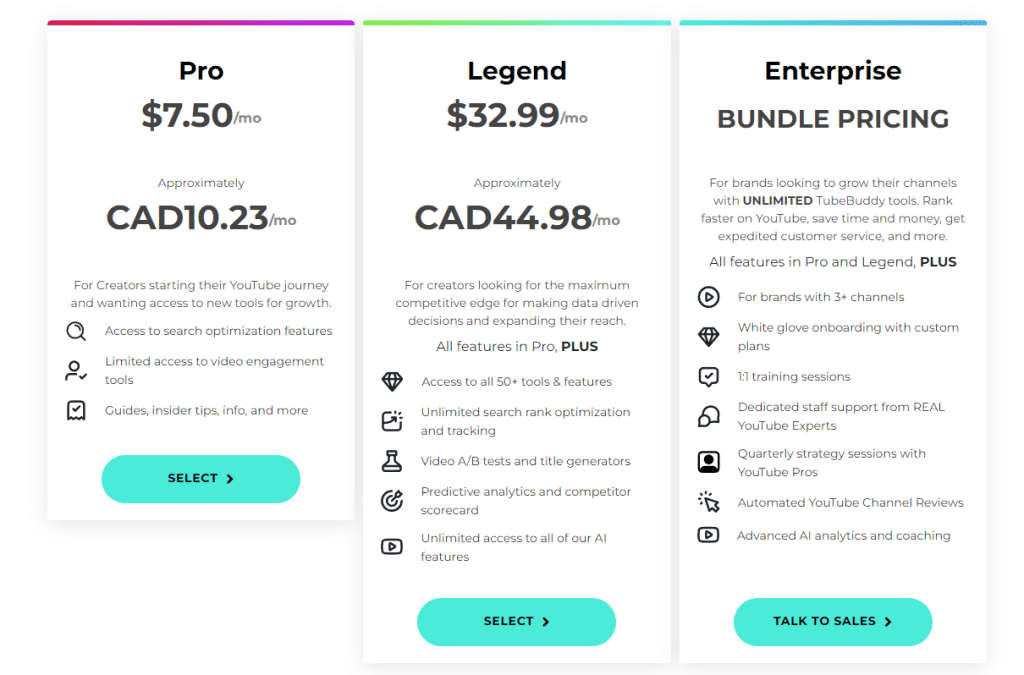
✅ TubeBuddy Pricing (2026)
• Pro: $7.50/month
• Legend: $32.99/month
• Free Plan: very limited
✅ Best For
• Beginners who need simple, clear YouTube SEO tools
• Creators who want optimized titles, tags, and descriptions
• Anyone who wants fast metadata creation + workflow shortcuts
• Channels that need bulk editing tools
• Creators who want A/B testing for thumbnails
• YouTubers who want to improve rankings without learning complex SEO

#2. VidIQ (Best for Keyword Ideas + Trending Topics)
VidIQ helps beginners find keywords, video ideas, trending topics, and competitor insights. Many YouTubers use VidIQ + TubeBuddy together to cover everything from SEO to trends.
How VidIQ Helps You
✔ Trending Topic Finder
Find topics people are searching for right now.
✔ Keyword Recommendations
Get high-performing keywords for your title, tags, and description.
✔ Competitor Analytics
See what others in your niche are ranking for.
✔ Video Performance Tracker
Track growth, views, and ranking movement.
✅ VidIQ Pros
• Lots of free tools
• Great idea generator
• Easy-to-understand metrics
• Strong competitor insights
✅ VidIQ Cons
• Keyword accuracy varies
• Interface can feel busy
• No keyword export
• Pro plan only supports one channel
✅ VidIQ Pricing (2026)
• Free Plan
• Boost: $49/month
• Coaching: $199/month
✅ Best For
• Creators who need help finding keywords + trending video ideas
• New channels looking for low-competition topics
• Creators who want to see what competitors are ranking for
• YouTubers who want real-time trend alerts
• Anyone who struggles with coming up with new video content
• Creators who want daily keyword scoring and performance tracking

#3. Semrush (Best for Advanced Keyword Research + Cross-Platform SEO Strategy)
Semrush is a super powerful, all-in-one SEO and marketing platform that goes far beyond YouTube.
While it’s not a YouTube-specific optimizer like TubeBuddy or VidIQ, it’s one of the strongest tools for building content strategies that work across YouTube + Blogs + Google Search + Social Media Platforms.
As well as:
- finding high-performing YouTube keywords
- analyzing trends
Because Semrush gives deep keyword data — including difficulty, trends, competition, and search volume — it’s a favorite among creators who want to build YouTube channels that also support their website, email list, and long-term brand.
What Semrush Does
Semrush specializes in advanced keyword and competitor intelligence. Creators use it to:
• find keywords using Semrush’s Keyword Magic Tool
• analyze search volume + competition levels
• discover trending topics before they peak
• research competitor websites AND YouTube content
• track keywords across multiple platforms
• understand user intent behind searches
• build content clusters for long-term traffic
Even though Semrush does not integrate directly inside YouTube, its keyword data is more accurate, more advanced, and more actionable than most YouTube-only tools.
How Semrush Helps You
✔ Deep Keyword Research for YouTube + Google
Find keywords with real search volume, ranking difficulty, competition levels, trends, and long-tail ideas.
✔ Competitor Intelligence
See what your competitors are ranking for — on YouTube AND on Google — so you can create smarter content.
✔ Topic Research for Video Ideas
Discover content gaps you can fill with videos.
✔ Cross-Platform SEO Strategy
Perfect for creators who want their blog + YouTube channel to grow together.
✅ Semrush Pros
• Most accurate keyword data on the market
• Amazing for multi-platform creators (blog + YouTube)
• Incredible competitor analysis
• Advanced filters for finding low-competition keywords
• Great for building content clusters
• Includes tools for social media, PPC, and brand monitoring
✅ Semrush Cons
• Expensive (more than Ahrefs for some plans)
• Not a YouTube-specific tool
• No built-in tag suggestions or YouTube upload optimization
• No thumbnail or A/B testing tools
• Can feel overwhelming for beginners
✅ Semrush Pricing (2026)
• Pro Plan: $129.95/month
• Guru Plan: $249.95/month
• Business Plan: $499.95/month
*No free plan. A 7-day trial is sometimes available depending on the promo.
✅ Best For
• Creators who want serious keyword research
• YouTubers who also run a blog
• Multi-platform brands
• People planning to scale content across YouTube + SEO
• Intermediate to advanced creators

#4. Tubics (Best AI-Powered YouTube SEO Tool)
Tubics uses AI to optimize your video titles, descriptions, tags, and thumbnails — making it perfect for creators who want faster SEO without learning technical terms.
What Tubics Does
• Writes AI titles
• Generates SEO descriptions
• Suggests keywords
• Provides thumbnail analysis
• Offers optimization scores
• Tracks keyword rankings
How Tubics Helps You
✔ AI-Generated Titles & Descriptions
Instant SEO-optimized copy without guesswork.
✔ Keyword Suggestions
Recommend keywords based on search demand.
✔ Thumbnail Testing
Shows which thumbnails attract more clicks.
✔ Full SEO Audits
Tells you exactly what to fix on each video.
Tubics Pros
• Saves time
• Very beginner-friendly
• AI reduces guesswork
• Great interface
Tubics Cons
• More expensive than other beginner tools
• Some features feel overly simple
• Not ideal for advanced creators
Tubics Pricing (2026)
• Plans typically start around $19–$39/month
• Custom enterprise plans available
#5. YouTube Studio Analytics (Best Free YouTube SEO Tool)
YouTube Studio Analytics is YouTube’s built-in optimization system — and one of the most powerful tools you already have access to.
What YouTube Studio Analytics Tracks
• CTR (click-through rate)
• Average view duration
• Audience retention
• Traffic sources
• Search terms
• Suggested video performance
How YouTube Studio Helps You
✔ Improve Your Titles + Thumbnails (CTR Data)
If CTR is low → your title or thumbnail needs improvement.
✔ Increase Watch Time
Retention graphs show where viewers drop off.
✔ Find Your SEO Keywords
See exact search terms people used to find you.
✔ Identify Winning Topics
Shows which videos drive subscribers.
YouTube Studio Pros
• Completely free
• Extremely accurate
• Essential for every creator
• Shows what YouTube “likes”
YouTube Studio Cons
• No keyword suggestions
• No A/B testing
• No competitor tools
Which YouTube SEO Tool Should YOU Choose?
If you want the Best YouTube SEO tools for Beginners in 2026, these are your winners:
⭐ TubeBuddy is #1.
For trending topics + ideas:
⭐ VidIQ
For advanced SEO + blogging:
⭐ Semrush
For AI titles + descriptions:
⭐ Tubics
For Analytics insights:
If you want to know how long your YouTube videos should be for the best rankings and watch time, check out my full guide here:
